Image Map
Showing posts with label classroom organization. Show all posts

Monday, August 5, 2013

Monday Made It! Organizers, Posters, Teacher Binder


I am linking up with Monday Made It at 4th Grade Frolics This is my first time linking up with this party, but I am so excited! The fact that I have something to link up with makes me feel like I've actually been productive! lol Today is my last day of summer! Teachers go back tomorrow and students follow suit next Tuesday. And what am I doing on my last day of "freedom"...waiting on the repair guy for our refrigerator and Jon to get home from MN!!

Keep us in your thoughts this week. He has not found a music teaching job yet, but he has an application in to a high school for an Assistant Director position that's an emergency fill becase they started on the 1st! His college professor called and talked with the director about him before he even applied, and he has already talked to the director when he submitted the application! He has been really upset about not having a job and being able to supply for us. He really needs this job!

You have probably seen these everywhere on Pinterest, and I was so excited to be able to make these!
On the three-drawer organizer I used CTP's Poppin Pattern's 2 in sticker letters. I found the organizer at Target. I found the bottom organizer at Lowe's. Home Depot had the vertical one that has 26 drawers. I used these labels that I found at Kristen Doyle's TPT store. She has three different styles of labels and they are all editable! My desk is so much cleaner and organized! So excited to be using these in my classroom this year.


Now I actally made all but 3 of these! I have found the Cubes, Groups, and Think about Math posters around the internet over the course of time, and all for FREE! I printed all of them at Office Depot, and using my Star Teacher card I get a discount on printing! I then backed them with construction paper, and the next step will be trimming them down and laminating them. I don't have my paper cutter at home so will have to trim them at school. All of these posters can be found in my TPT store!


 My Teacher Binder!!! I created so many different designs that it was so hard to finally pick the one that I wanted! I have 8 tabs for grades, lesson plans, calendar, etc. I found these clear pocket dividers from Avery that I was so excited about! Otherwise I wasn't sure how I was going to put them AND have tabs in my binder. There are labels that I have to print and then it's ready! I have several different designs in my TPT store as well!

Friday, August 2, 2013

Tune Into Technology: QR Codes!

Update: I found this PowerPoint presentation on one of my favorite websites that explains QR codes very well and has some examples of how they incorporate them into classroom/schools. I wanted to share it with all you! QR Codes in the Classroom

I am so sad to see this linky party come to an end. I have really enjoyed writing for it and have enjoyed reading everyone's ideas! Thank you so much to Kristin from iTeach 1:1 and Amanda and Aylin at Learning to the Core for hosting this wonderful linky party!


I have already written two posts about using QR codes before. One was written on Self-Checking Assessments and the other was ideas that I want to use for Classroom Management this year. I can't wait to implement them.

My favorite QR generators are QRstuff and Microsoft Tag. I use QRstuff on a more regular basis, but the nice thing about Tag is that you can change the code without having to print a new QR. This would be helpful if you had a laminated sign for links to visit that you would hang at the door or front of class, and you could change the links whenever you needed to. My favorite QR reader app is Scan available on both Apple and Android devices.

But Melissa, I don't have any smart devices in my classroom! No devices? No problem! One myth that I want to dissolve is....you DON'T have to have a Smart phone or device to use!!! You can use QR codes with a web cam and the internet. Download one of these programs to use right on your computer, Google Chrome Add-On or QuickMark. With the Google Chrome Add-On if the code is on the computer (webpage, blog, word doc, etc), you don't need a webcame! Simply right click the image and select Read QR code from Image.

Since I teach middle school, I do not have centers for my students. For activities, I use them more in a scavenger hunt way. I have done them where they have the problem and have to scan to check the answer and where they had the answer (from a previous problem) and had to scan for the next problem. Scanning to check the answer is MUCH easier for them and you! Some of my codes got in an infinite loop and caused some issues. Here is an example of the assignment and the codes. I cut the codes out and put them on colored index cards so they stick out on the walls and whiteboard. Somehow, I never got a picture of them doing these! (probably because I lent out my iPhone and iPad for them to use lol) I did use a worksheet style so that they could put them in their INB. Even with it being a worksheet, they love these and ask when we are going to do them again! If I can get middle schoolers to actually want to do math, I have succeeded. :-) 


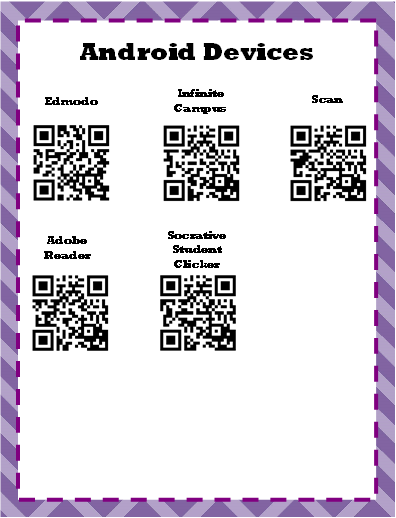
When I have an app I want the kids to download...I print QR codes. Sometimes I will leave one code at the front of the room (one each for Apple and Android), or I will make slips to give to the kids so they can download at home. No more wrong apps, broken links, "I can't find it", etc! I have these posters hanging in the classroom of apps that we commonly use. 


This year I am trying out new ways to use QR codes and will definitely be sharing them with ya'll!! And I promise I will be taking more pictures of my students using and implementing them in the classroom! 

Do you have any different ideas or ways you use QR codes in your classroom? Two more days left of summer for me, yet I am about to head up to school. The life of a teacher!

Related Posts Plugin for WordPress, Blogger...