Image Map
Showing posts with label QR codes. Show all posts

Friday, August 2, 2013

Tune Into Technology: QR Codes!

Update: I found this PowerPoint presentation on one of my favorite websites that explains QR codes very well and has some examples of how they incorporate them into classroom/schools. I wanted to share it with all you! QR Codes in the Classroom

I am so sad to see this linky party come to an end. I have really enjoyed writing for it and have enjoyed reading everyone's ideas! Thank you so much to Kristin from iTeach 1:1 and Amanda and Aylin at Learning to the Core for hosting this wonderful linky party!


I have already written two posts about using QR codes before. One was written on Self-Checking Assessments and the other was ideas that I want to use for Classroom Management this year. I can't wait to implement them.

My favorite QR generators are QRstuff and Microsoft Tag. I use QRstuff on a more regular basis, but the nice thing about Tag is that you can change the code without having to print a new QR. This would be helpful if you had a laminated sign for links to visit that you would hang at the door or front of class, and you could change the links whenever you needed to. My favorite QR reader app is Scan available on both Apple and Android devices.

But Melissa, I don't have any smart devices in my classroom! No devices? No problem! One myth that I want to dissolve is....you DON'T have to have a Smart phone or device to use!!! You can use QR codes with a web cam and the internet. Download one of these programs to use right on your computer, Google Chrome Add-On or QuickMark. With the Google Chrome Add-On if the code is on the computer (webpage, blog, word doc, etc), you don't need a webcame! Simply right click the image and select Read QR code from Image.

Since I teach middle school, I do not have centers for my students. For activities, I use them more in a scavenger hunt way. I have done them where they have the problem and have to scan to check the answer and where they had the answer (from a previous problem) and had to scan for the next problem. Scanning to check the answer is MUCH easier for them and you! Some of my codes got in an infinite loop and caused some issues. Here is an example of the assignment and the codes. I cut the codes out and put them on colored index cards so they stick out on the walls and whiteboard. Somehow, I never got a picture of them doing these! (probably because I lent out my iPhone and iPad for them to use lol) I did use a worksheet style so that they could put them in their INB. Even with it being a worksheet, they love these and ask when we are going to do them again! If I can get middle schoolers to actually want to do math, I have succeeded. :-) 


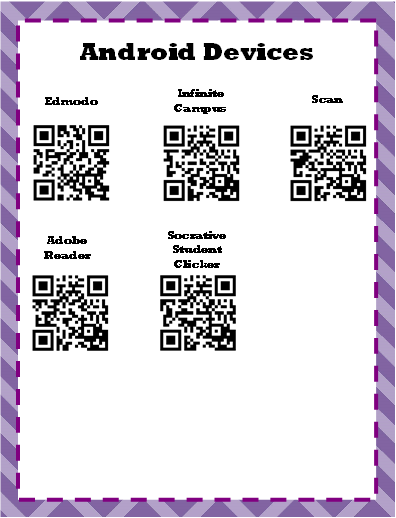
When I have an app I want the kids to download...I print QR codes. Sometimes I will leave one code at the front of the room (one each for Apple and Android), or I will make slips to give to the kids so they can download at home. No more wrong apps, broken links, "I can't find it", etc! I have these posters hanging in the classroom of apps that we commonly use. 


This year I am trying out new ways to use QR codes and will definitely be sharing them with ya'll!! And I promise I will be taking more pictures of my students using and implementing them in the classroom! 

Do you have any different ideas or ways you use QR codes in your classroom? Two more days left of summer for me, yet I am about to head up to school. The life of a teacher!

Friday, June 28, 2013

MORE QR Codes!

Where will this take you? 

So the last time I wrote about QR codes, I wrote about using them for self checking assessments. (You can find the blog post HERE and there is a link to a freebie from there as well!) But this time I was thinking about how I can use them for classroom management. So I've come up with several ideas that I can't wait to use this year!


  • Videos - I make or find videos for my students so that they can review math topics when they get stuck or when they are studying for a test. They have found them very helpful, but sometimes have a hard time finding them on my Edmodo sight if they are not directly above the fold on the home page. I can use the URL from the video to attach to a QR code, print them off and have them put them in their INB with their notes for that topic. 
  • Anchor Charts - I usually only keep anchor charts up for current topics, unless it is over something that we constantly refer back to. I have seen ideas for taking pictures and keeping them in a binder in the classroom for students refer to, and this would be nice especially for me! You can do the same thing with the QR codes by taking pictures of the chart. 
  • PowerPoint, InterWrite, SMART board - My school uses InterWrite tablets, and I absolutely love mine and don't know what I did before. It basically lets me control my computer, while also combining the interactive whiteboard. It uses a projector and screen so I still have my full whiteboard when I don't need it. Anyways, you could do the same things with these types of files but I would first convert or save them as a PDF file to avoid issues of not being able to open the file. 
  • Teacher Information - Parents can scan these on open house nights, parent teacher conferences, etc. to instantly have your contact information sent to their phone.
  • Secret Award Incentives - Print the codes and place on cards, bottle caps, etc. and have students draw for an incentive. They scan the code to find their secret award!
  • Links - I have posted one on my whiteboard with a "Scan Me" sign for students to scan as they come into class for a link we will be using that day. No more worrying about spelling or broken links!
  • Classroom Newsletters - Go Green! Send home QR codes for parents to scan to get your classroom newsletter!
If you don't have access to smart phones or iPads in your classroom, don't worry! You can download readers for computers that will work with a webcam! Very easy!
What are some other ways that you have used QR codes in your classroom?

Saturday, December 15, 2012

QR Codes - Self Checking Assessment

Hmmm...Where will this take you?!
First of all, I can not take all of the credit for coming up with this idea! My grade level partner, Laura, introduced me to using QR codes and scanners for students to self check assignments. I have loved using these, and the kids love them too! It takes what is normally boring math practice and turns it into a fun, technology activity for the kids. And it takes almost no time at all to plan!

QR codes, short for quick response, are a type of matrix barcode that are tide with different types of information. You can use them with plain text, websites, app downloads, contact info, etc. All you need is a code generator and a app device with a QR reader app downloaded.

My favorite code generator website to use is QR Stuff. They have 20 different ways you can enter information including the ones I mentioned before and YouTube, PayPal, social media, etc. I use plain text so when it it scanned only words will appear. This also let's the students not have to use WiFi to access a link, sometimes ours is a little spotty. Laura has done it to were the text is in a Google doc and they have to click on the link to see the text. Both methods work.

I download the barcode as a jpeg, and paste them into the document I've typed the worksheet on and cut them out. I tried this past time downloading them and printing one to a page and they came out really big which I thought would help, but they weren't as easy to scan. During the warm up of the next class I reprinted a small version and they worked much better.

My favorite app to use is called Scan because it is available on Apple and Android devices. I have told the students to download the app at home because they can not access the stores at school, and saves time. This app also shows the history of what you scanned. It is very user friendly and we haven't had any problems with it.

Here is a link to my NEW TeachersPayTeachers store for a FREE download of an activity that I have created that uses the QR codes! Cross-Multiply-QR-Self-Check
Related Posts Plugin for WordPress, Blogger...